19 Mayıs 2020 Salı

~ SEESAW ~

Hello everyone! Welcome to my blog!
    Today, I want tell you about an application that may be very helpful to use with our students when used correctly. We can have fun while doing so. I believe with the features it has, it can provide a great amount of feedback and progress knowledge of students for teachers very easily! Plus it is entertaining to use! Let’s have a look at this app in detail.
    Firstly when you open the app, it asks if you are a teacher or a student. We as teachers and our students should initially open our accounts which are presenting our position. 

Then, it makes you name one of your classes and then determine the grade it! I’ve chosen 8th grade here and named it ‘~English~’ . However, you can open as many classes as you need which will help you put everything in order regularly. 


When you push settings button in the app, you’ll see ‘class settings’, ‘add students’, ‘add parents’ options. Here you can adjust your preferences about each of your classes, add your students and also their parents as the followers of their children! Seesaw has a separate app (Seesaw Parent and Family) for this purpose. This may greatly effect children to not lose their focus in a way, with being aware of the fact that someone has an eye on them! 


As teachers, we can make certain important announcements to the parents of our children which they need to know. In that way teacher-students’ parents interaction will easily be provided!


In this platform you can assign your students by giving them related photos, links, videos or audios, you can create it as an activity as well. Students can also give their responses in these kind of various ways, in that way they can be creative! While creating your own assignment, firstly a topic name should be given. Then you can order all the necessary instructions learners need to know. I , as can be seen, added a video to my assignment. At the end I’ll share my assignment with all of you.
While the activities we create are in MyLibrary part, the ones that are created by our colleagues are in ‘Community’ section. Before preparing mine I examined all of them and saw  great ones. I would definitely like to assign some of them to all of my students! It is great to see many other examples of these exercises teachers all around the world create. It may help us keep up with the new useful ways of teaching and learning...


After giving the assignment, ‘Student Announcements’ section of the app can be used to inform our students about it! Here, I tried to give an example of such kind of announcement. Many other information about lesson, activities, materials, links of the useful sites, videos or anything that are helpful can be shared with children here.


By using the ‘post student work’ option we can share photos, videos, drawings , notes or links with each of the students specifically or with all of them. This will add the shared material to their journal (home page of the class). 


Last but not least, with ‘Skills’ we can see our students progress through the lesson with assignments/activities. This is also a great assistant for teachers to move their classes according to learners’ need.

Here with this link, you can see the first assignment I prepared for my students! I hope you liked it:
Check out my activity on Seesaw!
Topic: What’s the recipe of your favorite food/meal?

    To sum up, Seesaw is a very educational tool to use both in and out classroom. And, it is suggested by me to benefit from these helpful features of this app to the teachers!

17 Mayıs 2020 Pazar

ANOTHER VIRTUAL REALITY EXAMPLE: ‘SECOND LIFE IN EDUCATION’


Hello everyone. Welcome to my blog! 
I hope you have a nice day. Today in my blog we’re going to focus on how to teach in a platform like Second Life!
    
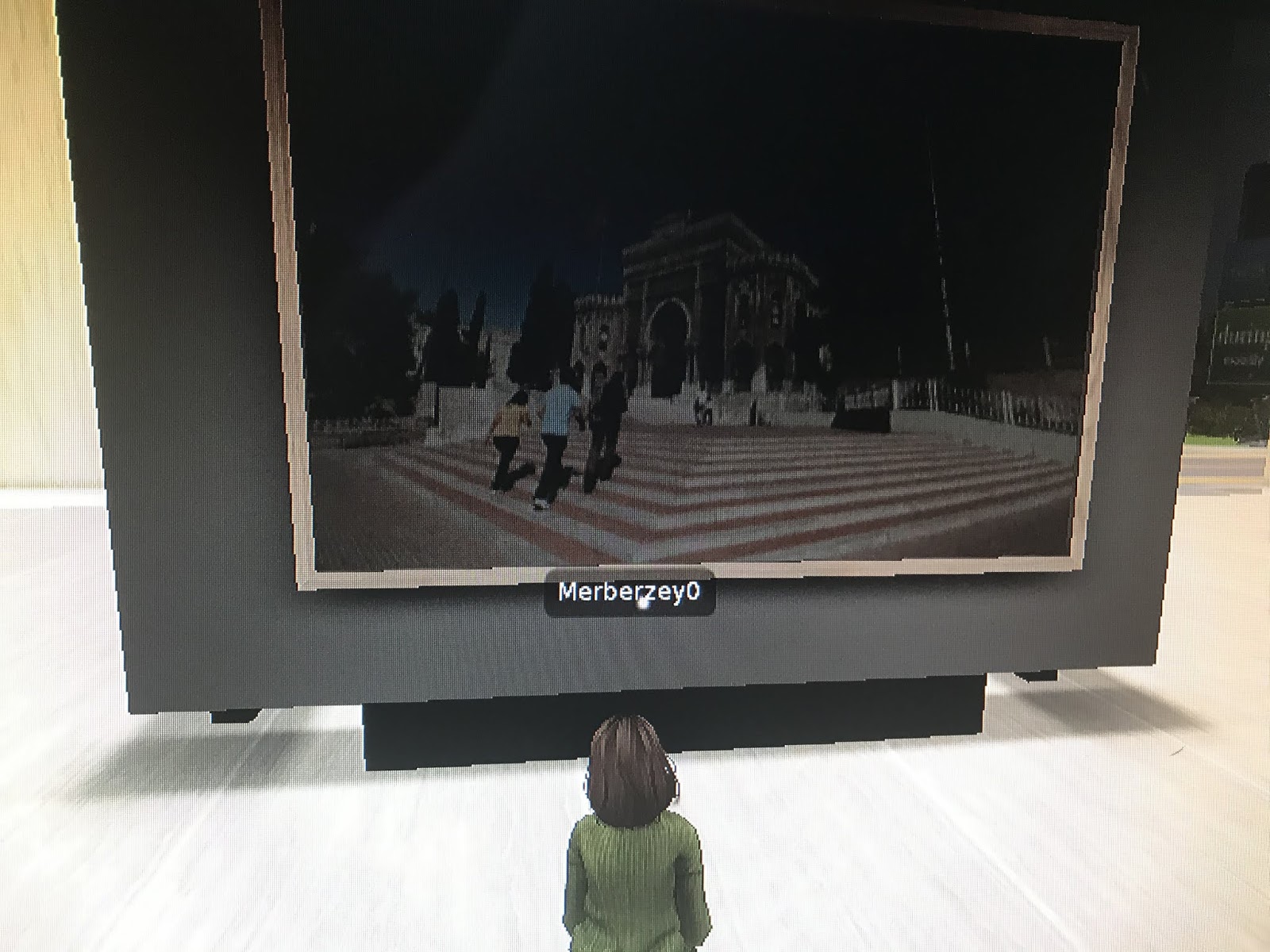
     Second life is a 3D virtual world in which users can create, interact, collaborate and chat with others for entertainment, education, business, socializing... It was developed and owned by the San Francisco-based firm Linden Lab and launched on June 23, 2003. So, this is also counted as virtual reality since in the game you’re like in a real environment... Today in my post, I’m going to briefly tell you how to use this platform in teaching. By the way, you start this game by choosing an existing avatar! So, first of all as teachers, we can teach our lessons in a class environment with  our students by using both our voices and texts in Second Life. It becomes just like a real classroom environment since students and teachers can interact, collaborate, ask questions to each other and so on. There are also chairs and desks as well! So, for example in these days of quarantine because of covid-19 , it would be very useful for students and teachers to use this platform because it’s not so different from a classroom! Secondly, in here students and teachers, while learning for example Shakespeare’s Plays , can find themselves in ‘The Wooden O’ just in seconds. If they’re learning about a place that is nearly impossible for them to go in real world, they might easily do it in here. Thirdly, you can play educational games within the Second Life. As teachers we can even use whiteboard , share information, present our lessons effectively by showing them the slides just like we can do in our real classroom environments. Students can perform their ‘role play activities’ here even in their own environments. Lastly I can say, learners may work on their projects, assignments by interacting and creating ideas together as well! However, there are so much more advantages Second Life provides to create an effective , real learning environment. In addition to these, in this game there are many campuses of educational institutions in which students can spent time!
Here are some photos from the game (educational use, my university..):


  I hope more teachers can explore and use Second Life in their teaching career to make education so much more effective and entertaining.

16 Mayıs 2020 Cumartesi

VIRTUAL REALITY IN LANGUAGE TEACHING & LEARNING

Hello everyone!
Welcome to my blog. I hope everyone a nice day. 
Today in my blog I want to talk to you about Virtual Reality and how can we benefit from it in language learning classes. Let’s start with learning what it is.

   Virtual reality is an artificial environment that is created with certain programs (softwares) and presented to the users. It’s mostly designed so realistically that they believe and feel like this environment is real. It uses computers, phones , tablets , headsets or any other technological tool to put you in a real environment! The most popular one of these tools are hand-mounted display ones. When you put them on your head you feel yourself in a virtual environment with the help of screen that are so close and all around your eyes. From the earliest SENSORAMA, to Google Cardboards, Daydreams, Oculus Rifts, Sony Morpheus, HTC vine.. many models of this technology can be seen in the history. They’re used frequently by people for many purposes like entertainment, education etcetera. Today, surely , we’ll focus on the educational uses, more specifically, on how to apply Virtual Reality in language teaching and learning classes. 

      For language teaching and learning, we can use the head-mounted displays in our classrooms while benefiting from certain apps that are created for language learning. I can give you 2 examples of those.  Firstly, House of Languages. In this app, you have 3 language options and these are English, German and Spanish. After choosing the language which are desired to learn, certain houses are seen representing vocabulary knowledge of different contexts like zoo, sports, hospital and so on... A student with the tool that s/he has on his/her head will choose and go into each of this rooms to learn the given words with a colorful, informative and both visual and audible virtual environment! The lovely teddy bear in the app wants from users to find certain objects and after they found it, it will pronounce it for you, in that way it can be very useful and effective to acquire some vocabulary knowledge with correct spellings thanks to this app! And what is more is that it’s free!


         Secondly, the app Mondly about which I posted in my blog earlier there is a VR supported part in which learners can find themselves in environments to use, practice the language with realistic avatars in certain contexts like restaurants, shopping, transportation, accommodation... It provides you with these useful options and with around 30 languages within its system. Sometimes avatars may just talk and inform about a topic or sometimes you can communicate with them , choose from suggested responses , say it out loud and consequently have an almost real dialogue! Thus students may perfect/improve their communicative skills while pronouncing,using, thinking about the correct forms and then gradually acquire the language. 

     To sum up, VR tools especially, head-mounted display devices can be used in classroom environments to kind of embody the items that are learned while trying to acquire the language. You can go everwhere any time and reinforce your students’ learnings. Some of the brands like Google Cardboard are pretty affordable and there are also lots of free applications that works with these devices. As teachers, I think, we should involve them in our lessons for the sake of better teaching & learning atmosphere. In an appropriate order or together, students may use them to implement their knowledge in the virtual reality. For instance when they are learning about hospital context they may find themselves in such a place examining and repeating the needed vocabulary like certain tools( needle, stethoscope) or workers( doctors, nurse), actions etcetera and even talk, communicate in such a ambience. That was just one of the examples of your options to take advantage of Virtual Reality. 

  I hope in Schools this technology might be used more often... 
Good bye everybody! 

15 Mayıs 2020 Cuma

PIXTON.COM / EDUCATION WITH COMICS: Create, learn, have fun..! Part 2

Hello everyone! 
Welcome to my blog. I hope you all are okay. 
Today in my blog, I want to talk to you about Pixton which is another educational tool that might be very helpful to use with your students. 

When you first open the page of Pixton , you’re welcomed with this page that asks if you’re an educator, student, parent or businessman. Surely, as we will be talking in this post, I’ve chosen ‘for educators’ option and got started!

Then, a really fun part is expecting you, creating your own avatar. From hair , lip shape, color to dress, position..! I ,for example, here tried to have the image of a teacher I always wanted to be. A simple, lovely and friendly teacher. 


Then, the platform wanted from me to name my class. In here, you can add as many classes as you need to divide your students and control their actions. Since my branch is foreign language teaching , I named my class English. Then I chose 5th grade students. 

After creating your class, your students also should be signed in this platform for you to add them to their own classes! What’s next? Let’s see.


In Pixton, when you just start to use it, there are 3 examples of comics like which you , your students or two of the parties will and can create. This is actually pretty helpful to make the application more user friendly. After examining the examples and reading the articles that were written to help us make our own comics, you got ready to practice!


 Here you can see my first comic that I just tried. While preparing I thought, actually with the help of comics you can be both very creative and have fun while learning! Such a blessing!
There are many options for backgrounds, avatars, chat bubbles or so on to make an effective and helpful comic which will be informative for students.
They can also create their own comics!


        In my own little comic I just made up to discover the app, I tried to teach some adjective vocabulary like tidy, untidy. However, this should be in a story form to make it a more educational material , also an easier material to understand. Again, students can do the same things to comprehend the lessons , topics!


Here’s the whole product of mine with Pixton:

    So, Pixton is a different and definitely nice way of teaching your students and making their knowledge about the language more permanent and understandable. Especially, when you buy a subscription that comes with so much more options to create avatars and backgrounds. 

I hope you’ll like it if you have the chance to use it. Take care!

VOKI & FLIPGRID: Create, learn, have fun..!


Hi, everyone! 
Welcome to my blog. I wish everyone a happy day. 
Today in my new post, I’ll be showing a very entertaining way of teaching certain things, assigning your students or any creative idea you may have with it! For this, I’ll review Voki and introduce Flipgrid to you all!  Let’s see.

VOKI
Voki is an edtech tool that might efficiently help teachers and learners in and out classroom environments. In this app, teachers and students might create their avatars, choose a background and then share the videos they made up. They just need to give voice to this avatar and their message!
Just give you an example, I downloaded and created my own cowgirl to give you an example, I tried to talk about Voki in a minute. Since I didn’t pay I did not get to use all the avatars and backgrounds but the existing ones. And, it goes for only one minute. So, I had to hurry a bit, but I think and I hope I’m understandable. Here’s my Voki video:


FLIPGRID
A similar app to Voki is Flipgrid. With the help of this app both students and teachers may share educational videos. Teachers can start discussions, present topics with their classes, learning communities or public Grid. And students can make their voice heard and respond with their own short videos and interact with not just their teachers but also with their friends! In that way, they can socialize , learn and have fun. Their developers introduces this platform with these words: “ Flipgrid empowers student voice and global emphaty through shared learning processes, stories and perspectives. Let’s amplify!”


In brief, as a teacher, you can benefit from these applications to have fun while teaching and making your students learn, as well!

13 Mayıs 2020 Çarşamba

QUIZLET IN LANGUAGE TEACHING AND LEARNING


Hello everyone!
Welcome to my blog. I wish everyone a peaceful day! 
Today the app I’ll be reviewing to you is going to be quizlet since it helps language learners improve their vocabulary with flashcards! Such a blessing! 

After downloading Quizlet application, I’ve searched through the ‘Study tests’ and ‘Classes’ to understand the system of it , also my dear friend Merve’s study set! ( check her out, her blog’s amazing!: https://mervesjournal.blogspot.com/?m=1 ). So, I’ve gone through some tests about the terms that were created, like my friends’ and I found it very useful for ‘teachers’ actually. Let’s examine it in detail!

-These were the ones I’ve examined-


As a teacher, you can create your ‘Study Set’ by firstly choosing a topic, and then writing the related terms under the topic with the translations of the words in which language you want to create it! In our case this is Turkish. If you have a Quizlet Plus account, which requires a payment, you can also add pictures or make your terms bold, italic or underline, that way they could be so much more easy to comprehend and learn! However, I had to try it without having a Plus account. I was still able to add terms as much as I want, so that was really cool!


After completing this part, your study set gets prepared with ‘Learn, Flashcards, Write, Match, Test’ phases. I was amazed to see a whole material with such a little effort! 


In ‘flash cards ’ part, you can see the flashcards, you can ‘flip’ them and see the terms in both the target language and the native language, or any other language you know and practice as much as you want to learn them!


In ‘learn, write, match, test’ the knowledge of the terms are evaluated. For example: 


Here students ‘write’ the translations of them and see if they’re correct or wrong. If they are correct they pass into a new question, however if they’re wrong the app shows them the correct answer (spellings) and then students can learn it by fixing these little ,completely normal, mistakes! 


Here , students should try to ‘match’ the correct  correspondences of the words and have fun while learning in such a gamified way.


And here, they can test their knowledge of the terms in the end by several ‘multiple choice’ , ‘true-false’ , ‘written’ tests!


Lastly, a great feature of this app is that , it provides the pronunciations of the terms just under this learning and evaluation part. Thus, students may learn not just the meanings of words but also how they are pronounced by a native speaker!


Long story short this application , when used correctly, might be very useful, efficient and in favour of students and teachers in their education life! That’s why I recommend it to anyone who has the chance to use Quizlet.

Here’s link of my quizlet study set if you would like to examine: https://quizlet.com/tr/507785517/sports-flash-cards/?i=2vixup&x=1jqY 

Have fun and goodbye! 


11 Mayıs 2020 Pazartesi

WHAT ARE TPACK AND SAMR MODELS? : How to Use in Language Teaching Classes?


Hello everyone! I hope you all are okay!
Today in my blog I’ll be sharing two models that may help teachers and learners to engage effectively with technology in classes and in specifically in language learning and teaching classes. Let’s examine them!


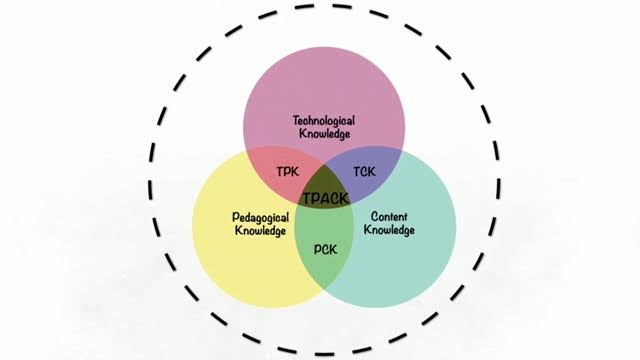
TPACK( Technological Pedagogical Content Knowledge)

Common Sense Education explains this model as “TPACK is a model that helps teachers consider where their strengths and weaknesses lie in their knowledge of content,pedagogy and how these areas work together for innovative teaching and learning.”. Here:
CK (Content Knowledge) represents ‘what you teach’. In language teaching case this may mean vocabulary knowledge, grammar knowledge and so on.
PK (Pedagogical Knowledge) represents ‘how we teach’. Here we can see all teaching methods, instructional strategies , assessment knowledge.
And TK( Technological Knowledge) represents our knowledge about the technological tools that can be used in classrooms from apps websites etcetera to games. 
These can also be united as PCK (Pedagogical Content Knowledge) , TPK (Technological Pedagogical Knowledge) TCK (Technological Content Knowledge) with making real and effective connections between the two elements. 
Lastly intersection of three knowledge domains represents Technological Pedagogical Content Knowledge , how our knowledge of teaching can be integrated with the things we teach and technology. 
So with the help of this model you can interact and collaborate with your students or your colleagues. 
How to use in Language Teaching?
Since language teaching requires a lot of interaction, collaboration, effective input, authentic materials , many tasks and exercises that needs listening, speaking, translating and so on , the aid of technology would be huge in class environments. Teacher can combine his/her teaching skills and ways with content that needs be taught and in the end might provide a very effective learning environment by adjusting all of these variants.


SAMR ( Substitution, Augmentation, Modification, and Redefinition) MODEL

This model was created by Dr. Ruben Puentedura. As can be understood by its name , the model has 4 components. Substitution and Augmentation are seen as ‘Enhancement’ steps when Modification and Redefinition are seen as ‘Transformation’ steps. Let’s examine each of them.

Substitution: Technology acts as a direct substitute with no functional change.
**Language learning students, in this phase may get help from Microsoft words, Prezi, PowerPoints, slides to see new forms/structures of language, to see how to write (letters,invitations etc.) exercises, to make activities like fill in the blanks and so on.
That way teachers can make classroom procedure differently rather than traditionally.

Augmentation: Technology acts a direct substitute , with functional improvement for students.
**With the help of this stage we can increase and enrich our students productivity in the learning environment. For example in language learning classes this may work in these ways: students can make videos on certain topics, make discussions, presentations and share them with their friends , so their friends can also see, comment and share their ideas etcetera. Some role plays or any type of activity which is in an information gap format can be applied in classroom with the help of technological devices. Therefore, the interactivity and a transition from individual learning to social learning may be provided easily. 

Modification: Technology allows for significant redesign 
Redefinition: Technology allows for the creation of new tasks, previously inconceivable
** These two stages expresses a transformation of practice. In modification part students may create and share new material/ works/ product using the multimedia resources available. In language learning case these products can be on any topic they want since a language includes any area of life within itself,surely, such as Natural disasters, Transportation vehicles, Sports , Culture, many structure knowledge, communication ethics and so on. In this way, teacher may save time while having an interactive and creative learning environment. As for Redefinition phase, Puentedura explain it as ‘Students taking charge of their education, feeling excitement & ownership of their learning, a continual re-examination of the practice.’. In this phase the providences teachers and learners have thanks to technology would not be had in any other way previously. This can be exemplified for language teaching as connecting with the native speakers of the language which is desired to learn, seeing their use of language, accent, even expressions and gestures and keep on their learning in the light of these informations... In other words this can be explained as ‘redefining the ways we enhance our learning’. 


                      photo from: https://www.showbie.com/showbie-samr-model/


In short since these models may be useful and effective in language learning classes and actually in any other classes, they may be comprehended and applied accurately as much as possible! 
I wish everyone a happy and healthy day!
Please don’t forget to use technology for the benefit of your education in these days of quarantine, good bye!